What Is High Bandwidth VPS and Who Needs It?
Learn what high bandwidth VPS hosting is and which workloads benefit most from unmetered data transfer.


Storage is one of the most overlooked bottlenecks in VPS performance. You can have fast CPUs and plenty of RAM, but if your disk can't keep up with database queries, file reads, and application I/O, everything slows down. The difference between NVMe and traditional SATA SSD storage isn't marginal — NVMe drives can deliver over 10x the random read IOPS at a fraction of the latency.
Here's what that means for your server and how to decide which storage type your workload actually needs.
Both NVMe and SATA SSDs use flash memory chips to store data. The difference is in how they connect to the rest of the system.
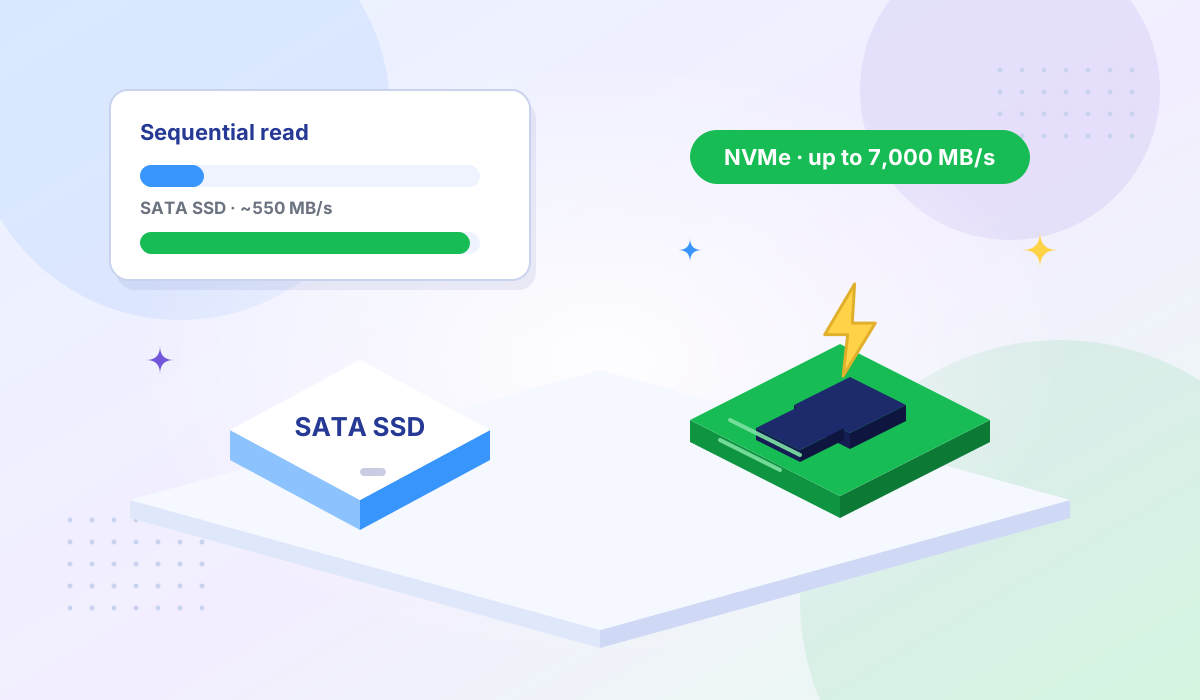
SATA SSD uses the SATA interface — the same connector originally designed for spinning hard drives. SATA III maxes out at 600 MB/s of theoretical throughput. In practice, SATA SSDs hit around 550 MB/s for sequential reads and 50,000–100,000 IOPS for random operations.
NVMe SSD connects directly to the CPU via PCI Express (PCIe) lanes. This eliminates the SATA bottleneck entirely. A PCIe 4.0 NVMe drive can reach 7,000 MB/s sequential reads and over 1 million random-read IOPS. The protocol itself is designed for parallel operations — NVMe supports up to 65,535 command queues with 65,536 commands each, compared to SATA's single queue of 32 commands.
| Metric | SATA SSD | NVMe SSD (PCIe 4.0) | Advantage |
|---|---|---|---|
| Sequential read | ~550 MB/s | Up to 7,000 MB/s | ~12x |
| Sequential write | ~520 MB/s | Up to 5,000 MB/s | ~10x |
| Random read IOPS (4K) | ~98,000 | ~1,200,000 | ~12x |
| Random write IOPS (4K) | ~88,000 | ~1,000,000 | ~11x |
| Average latency | 120–180 µs | 15–20 µs | ~8x lower |
| Command queues | 1 (32 deep) | 65,535 (64K deep each) | Massively parallel |
Sources: Device-level benchmarks compiled from ARPHost and WebSNP. Real VPS performance varies by provider and virtualization layer.
Raw drive specifications tell part of the story, but VPS performance depends on more than the underlying hardware. The virtualization layer, hypervisor I/O scheduling, and how many VPS instances share the same physical drives all affect what you actually experience.
In VPS benchmarks, the gap between NVMe and SATA narrows but remains significant. One set of VPS-level tests showed NVMe delivering roughly 425,000 random-read IOPS versus 62,000 for SATA — about a 7x advantage instead of the 12x at the bare-metal level (ARPHost, 2026). Read latency dropped from about 1 ms on SATA to 0.12 ms on NVMe.
That 7x difference is still massive when your database is handling concurrent queries or your web server is loading dozens of files per request.
MySQL, PostgreSQL, MongoDB, and Redis (when persisting to disk) all depend heavily on random I/O. Every query that hits disk rather than cache is limited by your storage IOPS and latency. NVMe's low latency and high IOPS directly reduce query response times — especially under concurrent load when SATA's single command queue becomes a chokepoint.
A typical e-commerce page load involves reading product data from a database, loading template files, checking session stores, and writing logs. With multiple concurrent visitors, these operations stack up. NVMe keeps response times consistent even when dozens of shoppers browse simultaneously. When your store handles payment data, pairing NVMe with PCI DSS compliant infrastructure gives you both speed and security.
Multi-tenant SaaS platforms where each customer's request hits the database create sustained random I/O patterns. SATA SSDs handle this adequately at low concurrency but degrade under load. NVMe maintains consistent performance as your user count scales.
Compiling code, running test suites, and building containers all involve heavy disk I/O — reading thousands of source files, writing build artifacts, and pulling container layers. NVMe can cut build times significantly, saving developer time across every commit.
Sequential throughput matters here. Restoring a 50 GB database dump from a SATA SSD takes roughly 90 seconds at 550 MB/s. On NVMe, that same restore completes in under 10 seconds. When downtime costs money, faster restores pay for themselves.
Not every VPS workload needs NVMe. SATA SSD is adequate for:
If your application fits these patterns, saving money on a SATA-based VPS is a reasonable choice. The moment you add a database with concurrent users, though, NVMe becomes worth the investment.
Don't trust marketing numbers alone. Here's how to benchmark your own VPS storage with fio, a standard Linux I/O testing tool:
Random 4K read (IOPS test):
fio --name=rand-read --ioengine=libaio --iodepth=64 \
  --rw=randread --bs=4k --direct=1 --size=1G \
  --numjobs=4 --runtime=30 --group_reporting
Sequential read (throughput test):
fio --name=seq-read --ioengine=libaio --iodepth=32 \
  --rw=read --bs=1M --direct=1 --size=1G \
  --numjobs=1 --runtime=30 --group_reporting
Look for the IOPS and lat (usec) values in the output. On NVMe, you should see 4K random reads above 100,000 IOPS with latency under 200 µs. If a provider advertises NVMe but you're seeing SATA-level numbers, the hypervisor may be throttling your I/O.
Every Tonic VPS plan runs on NVMe SSD storage paired with AMD EPYC processors. This combination ensures your storage I/O keeps pace with CPU and network throughput — there's no point in having high bandwidth if your disk can't feed data fast enough to saturate it.
Test it yourself: use our Looking Glass to check network performance, then run fio on a trial VPS to verify storage speeds match what you need.
NVMe drives are faster than SATA SSDs in every measurable metric. However, "SSD" is often used loosely — NVMe is a type of SSD. The meaningful comparison is NVMe SSD vs. SATA SSD. Both are solid-state; the difference is the interface and protocol.
For a small WordPress blog with caching enabled, probably not — most reads come from memory cache. For a WooCommerce store or membership site with many concurrent logged-in users (where caching is less effective), NVMe reduces page generation times noticeably.
Yes. Backups and restores are sequential operations where NVMe's higher throughput (up to 7,000 MB/s vs. 550 MB/s) makes a big difference. A database dump that takes 90 seconds on SATA can complete in under 10 seconds on NVMe.
Run lsblk -d -o name,rota,type on Linux. NVMe drives show up as nvme0n1 (not sda/vda). You can also check with cat /sys/block/nvme0n1/queue/rotational — a value of 0 confirms solid-state storage.
Storage speed directly impacts every operation your VPS performs — from serving web pages to running database queries to building code. NVMe's advantages in IOPS, latency, and throughput over SATA SSD are significant and measurable, especially for workloads with concurrent disk access.
If you're running databases, dynamic web applications, or any workload where multiple processes compete for disk I/O, NVMe isn't a luxury — it's the baseline for acceptable performance in 2026.
Ready for NVMe performance? Explore Tonic VPS plans — every plan includes NVMe SSD, AMD EPYC CPUs, KVM isolation, and high bandwidth across 8 global locations.
More VPS hosting guides, server tutorials, and infrastructure tips from our blog.
Learn what high bandwidth VPS hosting is and which workloads benefit most from unmetered data transfer.
Compare shared hosting, VPS, and dedicated servers side by side for traffic, budget, and performance.
Essential hosting security features every website needs — from SSL certificates to automated backups.